
AI Summarization
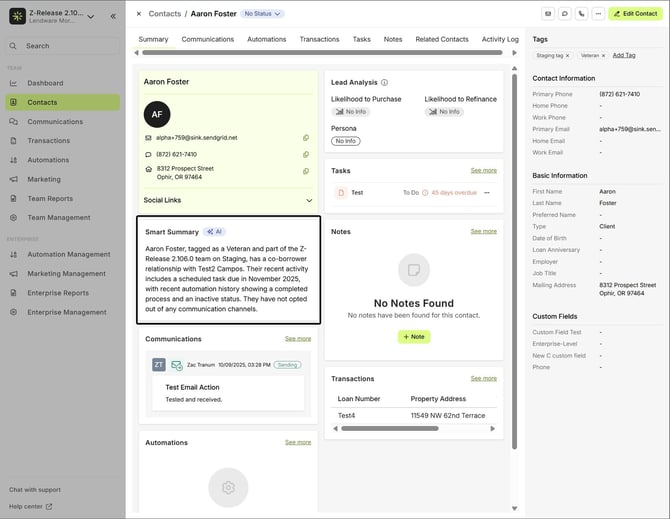
The Smart Summary provides a quick, AI-generated overview of a contact’s key details and recent activity.
Where to Find It
Currently, the Smart Summary is available inside a contact’s profile, in the Summary tab.
✨Smart Summary (AI)
What It Does
- Automatically summarizes the contact’s essential information.
- Highlights role, relationship type, contact info, and notes.
- Updates dynamically as new details are added.
💡 Smart Summaries are read-only for now, generated automatically based on available data.
💬 Sentiment Analysis
The Sentiment Analysis feature uses AI to detect the tone of your conversations, helping you understand how interactions are going at a glance.
Where to Find It
You can view sentiment tags in two places:
- Inside a contact’s Communication tab
- Or directly from the main Communications tab on the left-hand panel
Sentiment Types
- Positive (Green): Indicates a friendly or successful interaction.

- Neutral (Dark Gray): Reflects balanced or factual communication.

- Negative (Red): Signals frustration or an issue that may require follow-up.

💡 Why It’s Useful
- Instantly gauge client satisfaction and tone.
- Spot which conversations might need attention.
- Track overall sentiment trends to improve communication strategy.
Sentiment in Automations
Beyond simple tone detection, Sentiment Analysis can actively influence your automations.
How It Works
-
Sentiment Evaluation
The AI reviews the latest communication and assigns a sentiment score (Positive, Neutral, or Negative). -
Recommendation Trigger
Based on that tone, the AI generates a suggestion — for example:
“The message content is neutral, primarily consisting of informational and disclaimer text with no emotional tone.” -
User Notification
The targeted user (Contact Assignee or Contact Owner) receives a notification showing:-
The record the suggestion applies to
-
The AI’s recommendation message
-
A text area for adding notes or merge fields for more context

-
-
Decision Control
The user can then choose Yes or No directly from the notification to continue or stop the automation.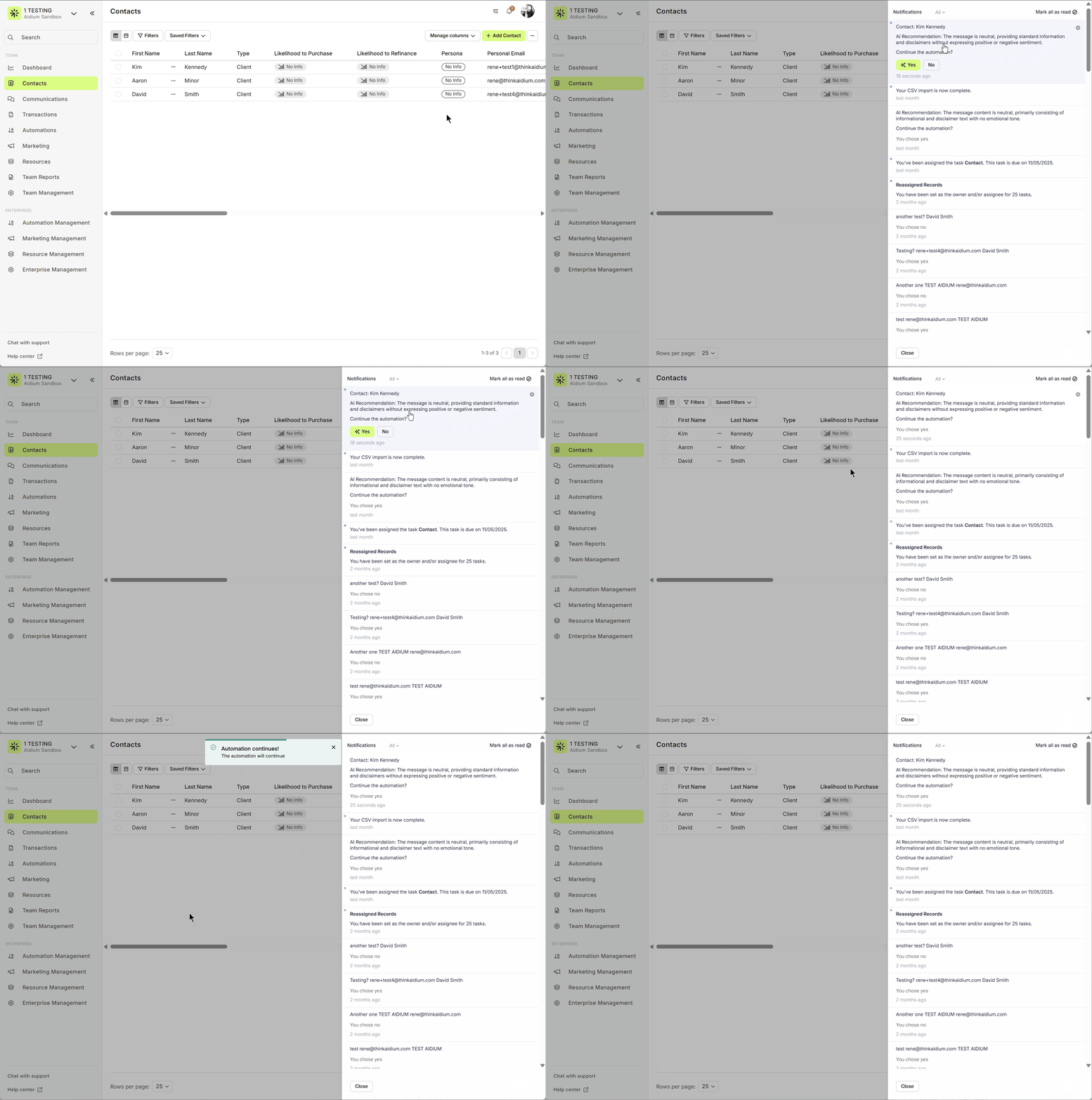
💡 This feature integrates seamlessly with Lendware, helping automate responses, reduce manual follow-ups, and ensure every client interaction feels personal and well-timed.
Real-Time Updates
Both Smart Summaries and Sentiment Analysis update automatically whenever new information or interactions are detected — ensuring your insights stay current.
🚀 Part of Lendware’s Expanding AI Toolkit
Together, Smart Summaries, Sentiment Analysis, and AI Recommendations help you:
-
Save time reviewing contacts
-
Understand client sentiment faster
-
Make smarter, data-driven automation decisions